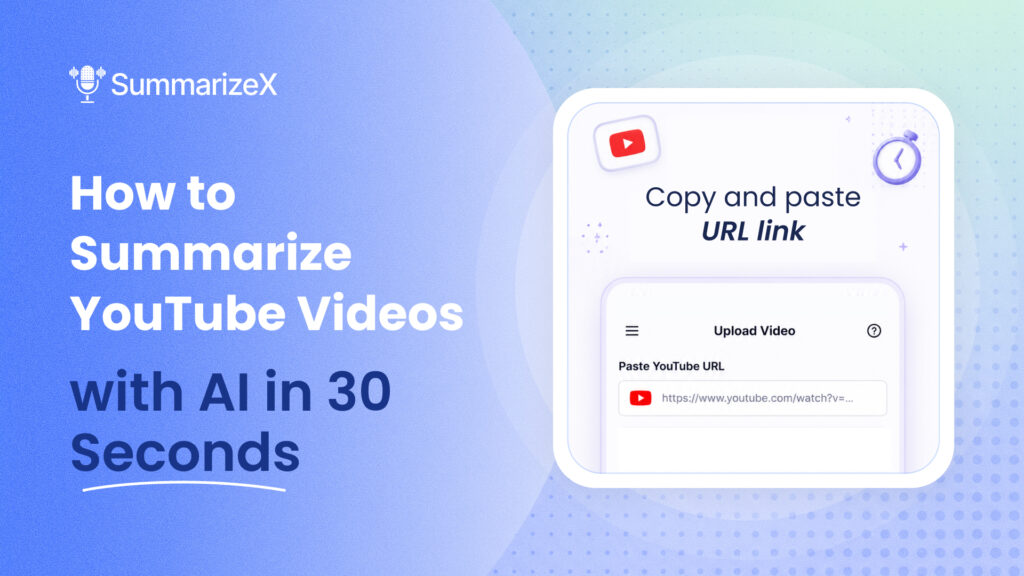
You found a 45-minute conference talk, a 2-hour podcast interview, or a lecture your professor uploaded at midnight. You don’t have time to watch the whole thing. You just need the key points.
AI can summarize YouTube videos for you. You paste a link, wait about 30 seconds, and get a written summary with the main ideas, timestamps, and action items pulled out. No transcript needed, no Chrome extension required, and it works on your phone.
In this guide, we’ll show you how to summarize any YouTube video using SummarizeX and compare it to other tools that do the same thing. If you’re looking for the fastest mobile-first option, SummarizeX handles it in three taps. If you want alternatives, we cover those too.
How to Summarize a YouTube Video with SummarizeX (Step by Step)
This takes about 30 seconds from start to finish. SummarizeX works on iPhone, Android, and the web app.
Step 1: Copy the YouTube URL
Open YouTube and find the video you want to summarize. Tap the Share button and copy the link. Any public YouTube video works, including lectures, podcasts, interviews, tutorials, and conference talks.
Step 2: Open SummarizeX and paste the link
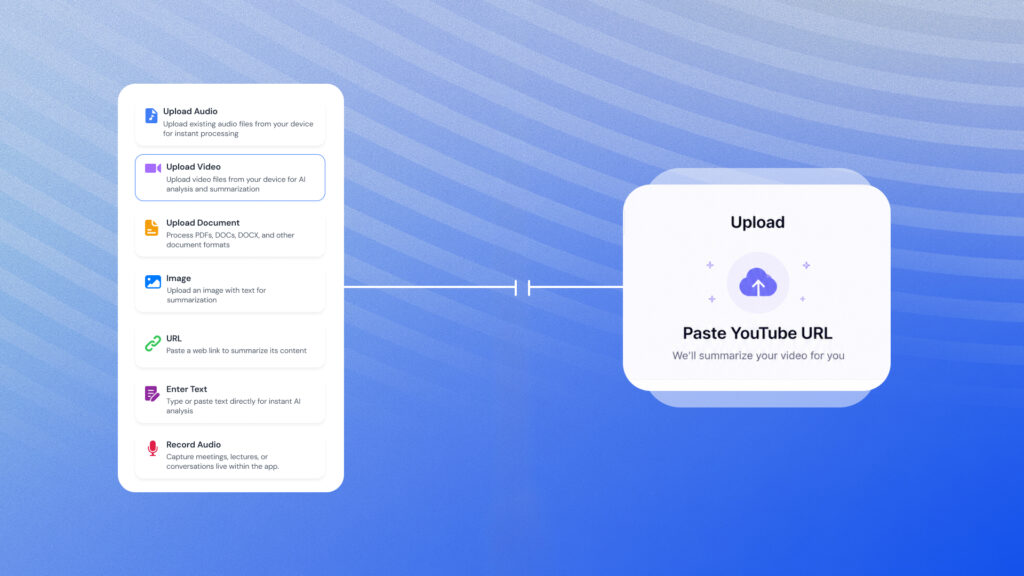
Open the SummarizeX app (or go to app.summarizex.ai on desktop). Tap the upload option and paste the YouTube URL. The app accepts any standard YouTube link format.
Step 3: Choose your summary style
SummarizeX offers multiple summary modes depending on what you need:
- Overview & Key Points – a quick summary with the main takeaways (available on the free plan)
- Lecture Notes – structured notes with headings, great for educational content
- Detailed Summary – a thorough breakdown of every major topic covered
- Action Items Only – just the to-dos and next steps mentioned in the video
Step 4: Get your summary
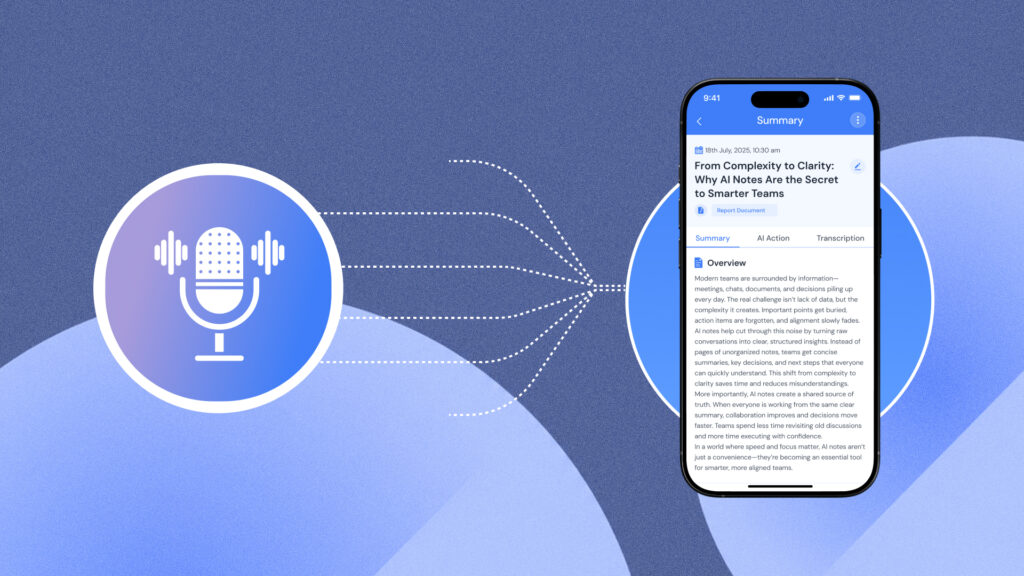
Hit summarize and wait about 30 seconds. SummarizeX transcribes the video’s audio, processes it through AI, and returns a written summary. You can read it in the app, export it as PDF or text, or share it via email, WhatsApp, or Slack.
That’s it. Four steps, roughly 30 seconds of waiting, and you have a summary of a video that would have taken an hour to watch.
Want to try this yourself? SummarizeX is free to start with 10 summaries per month.
Why Summarize YouTube Videos with AI?
YouTube has over 800 million videos. A growing number of those are long-form content: lectures, podcasts, webinars, product demos, and research talks. Watching everything at full length isn’t realistic.
Here’s where AI YouTube summarization makes sense:
- Students reviewing lecture recordings before exams. A 90-minute lecture becomes a 2-page summary you can study from.
- Professionals keeping up with industry talks and conference keynotes without blocking 3 hours on the calendar.
- Researchers scanning interviews and panel discussions for relevant quotes and data points.
- Content creators consuming competitor videos to identify trends and gaps.
- Anyone who saves YouTube videos to “watch later” and never does. A summary lets you get the value without the time commitment.
The alternative is watching at 2x speed, which still takes 45 minutes for a 90-minute video and you’ll miss details. AI gives you the key points in a format you can search, highlight, and reference later. If you’re interested in how AI notes fit into a broader knowledge workflow, they’re quickly becoming a core part of how people consume content.
SummarizeX vs Chrome Extension YouTube Summarizers
Most YouTube summarization tools are Chrome extensions. They work fine on a laptop, but they don’t help when you’re on your phone, tablet, or anywhere without Chrome. Here’s how SummarizeX compares:
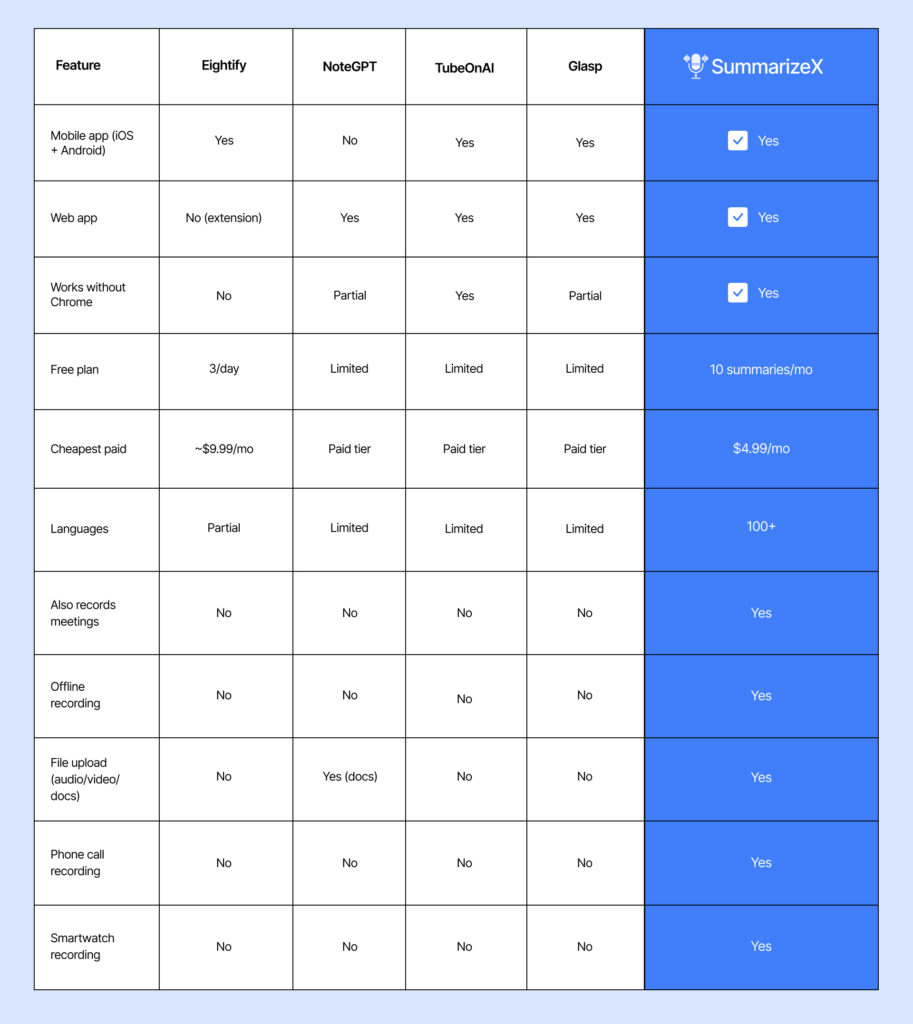
The biggest difference: Chrome extensions only summarize YouTube. SummarizeX also records meetings, phone calls, lectures (even offline), uploads audio/video/document files, and works from your Apple Watch. If you want one app that handles all your summarization needs, not just YouTube, SummarizeX covers more ground.
That said, if you spend most of your day in Chrome and only need YouTube summaries, Eightify and Glasp are decent browser-only options.
Can You Summarize YouTube Videos for Free?
Yes. Several tools offer free YouTube summarization, but the limits vary a lot:
- SummarizeX: 10 free summaries per month. Works on mobile and web. No Chrome required. Also includes meeting recording, file uploads, and 100+ languages on the free plan.
- Eightify: 3 free summaries per day. Chrome extension only.
- Glasp: Free tier with limited features. Chrome + mobile app.
- ChatGPT: You can paste a transcript into ChatGPT and ask for a summary, but you need to get the transcript yourself first. No direct URL support.
SummarizeX’s free plan is the most versatile because it combines YouTube summaries with other features. You’re not just getting a YouTube tool – you’re getting an all-in-one AI note-taker that happens to also summarize YouTube videos.
For the “summarize youtube video ai free” search: SummarizeX is the strongest free option if you need a mobile app that works beyond just YouTube.
Does It Work Without a Transcript?
Yes. This is a common concern because some YouTube videos don’t have subtitles or auto-generated captions. SummarizeX doesn’t rely on YouTube’s transcript. It processes the video’s audio directly using its own AI transcription engines (Deepgram Nova-3, OpenAI Whisper, and Gemini 2.5 Flash).
That means you can summarize:
- Videos with no captions at all
- Videos in languages other than English (100+ languages supported)
- Videos with auto-generated captions that are full of errors
- Unlisted videos (as long as you have the URL)
Chrome extensions like Eightify typically depend on YouTube’s built-in transcript. If the video doesn’t have one, the extension fails. SummarizeX avoids this problem entirely by processing the audio itself.
Summarize YouTube Videos in Any Language
Most YouTube summarizers only work well in English. SummarizeX supports 100+ transcription languages, which means you can summarize videos in Spanish, Hindi, Japanese, Arabic, German, French, Korean, Portuguese, and dozens more.
This is useful for:
- Language learners who want summaries of foreign-language content
- International students watching lectures in their second language
- Researchers reviewing content from non-English sources
- Multilingual teams sharing summaries across language barriers
If multilingual transcription matters to you, we wrote a deeper guide >how SummarizeX handles any language.
Beyond YouTube: What Else Can You Summarize?
YouTube is just one input type. SummarizeX also summarizes:
- Live recordings – meetings, lectures, phone calls, conversations (even offline)
- Audio files – MP3, WAV, M4A, and other formats
- Video files – MP4, MOV, AVI, and more
- Documents – PDFs, Word docs, images with text
- Web pages – paste any URL and get a summary
This is what sets SummarizeX apart from dedicated YouTube tools. You get one app for all your summarization and note-taking needs, not five different tools for five different content types.
SummarizeX starts free (10 summaries/month, 30-min recordings). Paid plans start at $4.99/month for students and $9.99/month for professionals, with yearly billing saving about 17%.
Frequently Asked Questions
Can AI summarize a YouTube video?
Yes, AI can summarize any YouTube video by processing its audio through speech-to-text transcription and then generating a written summary using large language models. SummarizeX is one of the easiest tools for this. You paste a YouTube URL into the app, choose a summary style like Overview and Key Points or Detailed Summary, and receive a complete written summary in about 30 seconds. The AI identifies the main topics discussed, extracts key arguments and data points, and organizes them into a readable format. Unlike manual note-taking, AI summarization captures details you might miss while watching at normal speed. SummarizeX processes the video’s actual audio rather than relying on YouTube’s auto-generated captions, which means it works on videos without subtitles and supports 100+ languages. The free plan includes 10 summaries per month, making it practical for students, researchers, and professionals who regularly consume long-form YouTube content.
Which AI can summarize YouTube videos?
SummarizeX is the most versatile AI tool for summarizing YouTube videos in 2026 because it works on mobile, desktop, and web without requiring a browser extension. You paste any YouTube URL and get an AI-generated summary in about 30 seconds. Other options include Eightify, which works as a Chrome extension and offers 3 free summaries per day but only functions inside the Chrome browser. TubeOnAI and Glasp also offer YouTube summarization with mobile apps, though with more limited free tiers and fewer languages. NoteGPT provides web-based summarization for YouTube and documents. You can also paste a video transcript into ChatGPT or Claude and ask for a summary manually, but this requires extra steps to obtain the transcript first. The key difference with SummarizeX is that it also records meetings, phone calls, and lectures, uploads files, and supports 100+ languages, so you get a complete AI note-taking tool rather than a single-purpose YouTube summarizer.
Can AI summarize a YouTube video without a transcript?
Yes. SummarizeX does not depend on YouTube’s auto-generated captions or subtitle files to summarize a video. Instead, it processes the video’s audio directly using three AI transcription engines: Deepgram Nova-3, OpenAI Whisper, and Gemini 2.5 Flash. This means you can summarize videos that have no subtitles, videos with disabled captions, and videos in languages where YouTube’s auto-captioning performs poorly. Most Chrome extension summarizers like Eightify rely on YouTube’s built-in transcript data, so they fail or produce poor results when captions are unavailable or inaccurate. SummarizeX avoids this limitation entirely. The audio-based approach also means SummarizeX handles accents, background noise, and multiple speakers more reliably than tools that depend on YouTube’s automatic speech recognition. If you regularly encounter YouTube videos without transcripts, particularly in non-English languages or from smaller creators who don’t add captions, SummarizeX is the most reliable option.
What is the best app to summarize YouTube videos on mobile?
SummarizeX is the best mobile app for summarizing YouTube videos because it works natively on both iPhone and Android without requiring a browser extension. You copy a YouTube link, open SummarizeX, paste the URL, and get an AI summary in about 30 seconds. The app offers four summary modes including Overview and Key Points, Lecture Notes, Detailed Summary, and Action Items Only, so you can choose the format that fits your needs. SummarizeX supports 100+ transcription languages, which makes it especially useful for international content that English-only tools cannot handle. The free plan includes 10 YouTube summaries per month. Other mobile options include TubeOnAI and Glasp, which have iOS and Android apps but offer more limited free tiers, fewer summary modes, and less language coverage. Eightify has mobile apps but is primarily designed as a Chrome extension. For a mobile-first experience that also handles meeting recordings, file uploads, and offline transcription, SummarizeX offers the most complete package.
Is it legal to summarize YouTube videos with AI?
Summarizing YouTube videos for personal use, education, or research is generally considered fair use in most jurisdictions. You are not downloading, redistributing, or republishing the original video content. AI summarization creates a derivative text summary of the ideas discussed, similar to taking notes while watching. However, there are nuances worth understanding. If you plan to publish AI-generated summaries commercially, such as on a blog or in a paid newsletter, you should review fair use guidelines in your jurisdiction and consider whether the summary could substitute for the original content. YouTube’s Terms of Service prohibit unauthorized downloading of videos, but summarization tools like SummarizeX process the audio stream without downloading the video file itself. For educational, professional, and personal productivity use cases, AI YouTube summarization is widely accepted and practiced. When in doubt, credit the original creator and link to the source video.
Get More From Every YouTube Video
You don’t need to watch every video start to finish to get the value out of it. AI summarization gives you the key points, action items, and main arguments in a format you can read in two minutes, search later, and share with your team.
SummarizeX makes this simple: paste a YouTube link, pick your summary style, and you’re done. And when you need more than YouTube summaries, the same app records your meetings, transcribes your phone calls, and processes your uploaded files, all in 100+ languages.
Try SummarizeX free – record your next meeting, paste a YouTube link, or upload an audio file and get an AI summary in seconds. No credit card needed.
Download on the App Store| Get it on Google Play |Get Started with Web app