
Most AI meeting tools assume you’re on a Zoom call. They join as a bot, record the audio from the platform, and generate a transcript. That works fine for virtual meetings. But when you’re sitting in a conference room, a classroom, or a coffee shop, those tools are useless.
An AI note taker for in-person meetings needs to do something different: record audio directly from your device’s microphone, work without a stable internet connection, and still give you the same AI-powered summaries and transcriptions you’d get from a virtual meeting tool.
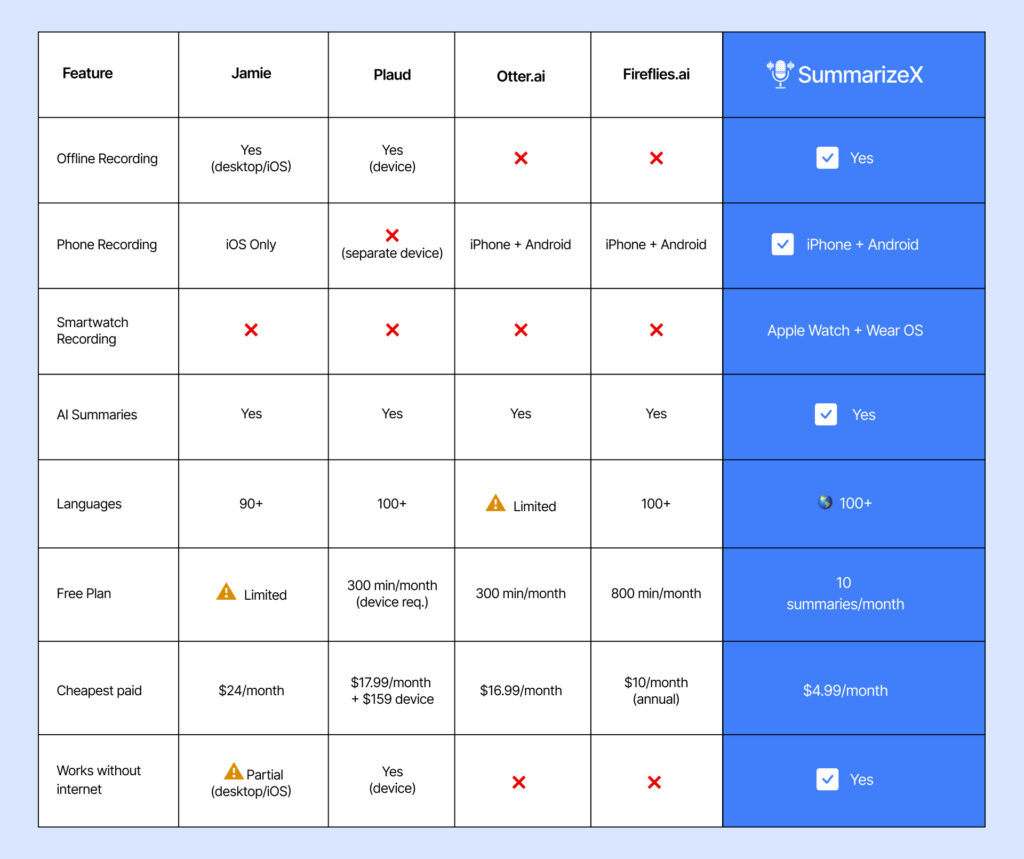
We tested five apps that handle in-person meeting recording and ranked them based on offline capability, AI summary quality, language support, and price. SummarizeX came out on top because it’s the only option that works offline across phones and smartwatches at a price that makes sense. But each app on this list has a use case where it fits.
Quick Comparison: In-Person Meeting Note Takers
Why Most AI Meeting Tools Don’t Work In-Person
Tools like Otter.ai and Fireflies.ai are built around meeting bots. The bot joins your Zoom, Google Meet, or Teams call, captures the audio from the platform, and processes it in the cloud. This design falls apart for in-person meetings because:
- No meeting link to join. There’s no Zoom URL for your 1-on-1 at a coffee shop.
- Internet dependency. Many meeting rooms, classrooms, and event venues have unreliable Wi-Fi. Cloud-dependent tools can’t record if they can’t connect.
- Bot notifications. Even if you dial into a virtual meeting from a conference room, the bot notification (“Otter.ai has joined”) creates an awkward dynamic in face-to-face settings.
The shift toward recording in-person meetings has accelerated in 2026, but the tools haven’t kept up. Most of them still assume a virtual-first workflow. That’s the gap apps like SummarizeX fill.
1. SummarizeX: Best Overall for In-Person Meetings
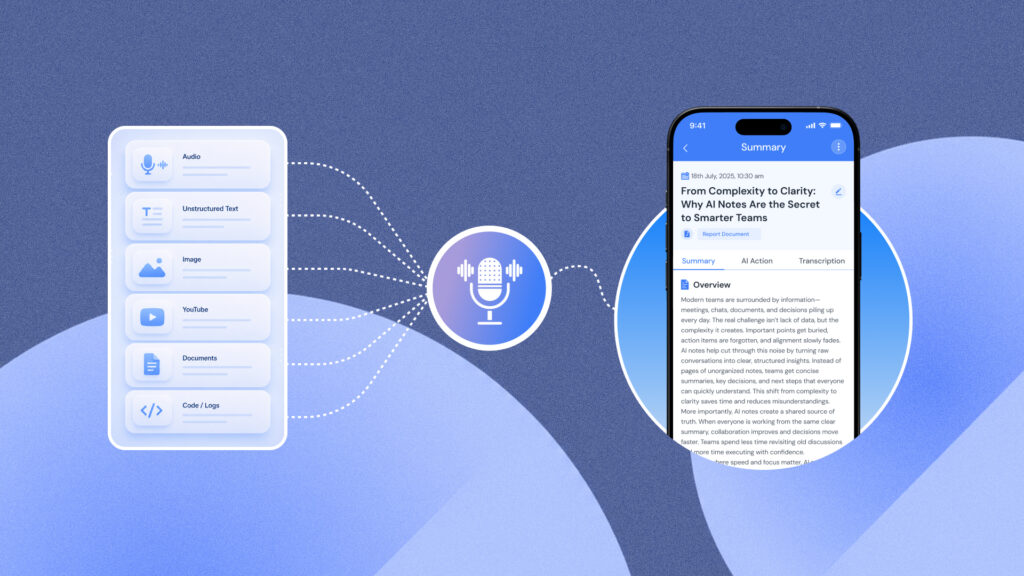
SummarizeX is built for exactly this use case. Open the app, tap record, set your phone on the table, and it captures the full conversation through your device mic. No internet required. When you’re back online, it transcribes and summarizes everything automatically.
Why it’s the best for in-person
- True offline recording. Records on iPhone, Android, Apple Watch, and Wear OS without any internet connection. The audio is stored locally and processed when you reconnect.
- Smartwatch recording. Start a recording from your Apple Watch or Wear OS device without pulling out your phone. Useful for walking meetings, doctor visits, or situations where a phone on the table feels too formal.
- Multiple summary modes. After recording, choose from Overview & Key Points, Detailed Summary, Lecture Notes, or Action Items Only. The Action Items mode is particularly useful for meeting follow-ups.
- 100+ languages. If your in-person meetings happen across languages, SummarizeX handles transcription in 100+ languages using three AI engines (Deepgram Nova-3, OpenAI Whisper, Gemini 2.5 Flash).
- Background recording. Start the recording and use your phone normally. SummarizeX records in the background, so you can check emails, take manual notes, or pull up documents during the meeting.
Pricing
| Plan | Monthly | Yearly | Key Limits |
| Free | $0 | $0 | 10 summaries, 30-min recordings |
| Student | $4.99 | $49.99 | 25 summaries, 60-min recordings |
| Personal | $9.99 | $99.99 | 40 summaries, 120-min recordings |
Best for
Students recording lectures, freelancers in client meetings, journalists in interviews, managers in team huddles, and anyone who has in-person conversations they want to remember accurately.
“Few weeks back, I got to know about this app and when I used it, it was too good. It helps me to record my in person meetings with my colleagues and client and generate the summary and action plans within a minute.” – Play Store review
Want to try this yourself? SummarizeX is free to start with 10 summaries per month.
2. Jamie: Best for Desktop Offline Recording
Jamie records audio locally from your computer’s microphone, which means it works for in-person meetings when you have a laptop in the room. It doesn’t join as a bot, so there’s no notification that an AI tool is recording.
Key features
- Offline recording on macOS, Windows, and iOS
- Bot-free approach works with any audio source
- 90+ language support
- Integrations with Notion, Asana, and Google Docs
Where Jamie falls short for in-person
- No Android app. If your team uses Android phones, Jamie isn’t an option for mobile recording.
- No smartwatch app. You need a laptop or iPhone in the room.
- Expensive. Starts at $24/month per user, with a 20-meeting limit on the cheapest plan. That’s nearly five times what SummarizeX charges.
- No phone call recording, YouTube summaries, or file uploads.
Pricing
- Free: Limited meetings
- Plus: $24/mo per user (20 meetings/month)
- Pro: $47/mo per user
- Executive: $99/mo per user
Best for
Teams that already use laptops in every meeting and want a desktop-first tool with integrations into their existing project management stack.
3. Plaud: Best Dedicated Recording Hardware
Plaud takes a completely different approach. It’s a physical device, roughly the size of a credit card, that you place on the table to record. The audio syncs to a companion app that handles AI transcription and summaries.
Key features
- Discreet hardware device (no phone on the table)
- Offline recording through the physical device
- 100+ language support
- AI summaries with 10,000+ templates and mind maps
- Speaker identification
- HIPAA and GDPR compliant
Where Plaud falls short for in-person
- Requires a $159-$189 hardware purchase before you can use it at all. That’s a significant upfront investment.
- Total first-year cost is $259+ (device + Pro subscription).
- No YouTube summaries or document uploads.
- You need to carry an extra device. Your phone or smartwatch is always with you. A Plaud device is one more thing to remember.
Pricing
- Device: $159 (Note) to $189 (Note Pro). Required.
- Free (Starter): 300 min/month. Included with the device.
- Pro: $17.99/mo or $99.99/yr (1,200 min/month)
- Unlimited: $29.99/mo or $239.99/yr
Best for
Executives, lawyers, or medical professionals who need a discreet, dedicated recording device for high-stakes in-person conversations and value HIPAA/GDPR compliance.
4. Otter.ai: Best Known, But Limited In-Person
Otter.ai is the most recognized name in AI meeting notes, but it’s primarily designed for virtual meetings. It does have a mobile app that can record audio from your phone’s microphone, which technically works for in-person settings.
Where Otter falls short for in-person
- No offline recording. Otter requires an internet connection to function. If you’re in a meeting room with weak Wi-Fi, you’re out of luck.
- Limited language support. Primarily English-focused, which is a problem for multilingual teams.
- No smartwatch app. No Apple Watch or Wear OS recording.
- Expensive for what you get in-person. At $16.99/month, you’re paying for virtual meeting bot features you won’t use in face-to-face settings.
Pricing
- Free: 300 min/month (3 min per uploaded file)
- Pro: $16.99/mo
- Business: $30/mo per user
Best for
Users who primarily take virtual meetings but occasionally want to record an in-person conversation in a location with reliable internet. If you need offline or multilingual support, other alternatives offer more.
5. Fireflies.ai: Enterprise-Focused, No Offline
Fireflies.ai added mobile recording recently, allowing you to capture in-person audio through your phone. But like Otter, it needs an internet connection for all core features.
Where Fireflies falls short for in-person
- No offline recording. The mobile app needs the internet to transcribe and summarize.
- No smartwatch app.
- Credit-based AI features can make costs unpredictable for heavy users.
- Built for sales teams. CRM integrations and conversation analytics are its strengths, not in-person note-taking.
Pricing
- Free: 800 min/month
- Pro: $10/mo (annual) or $18/mo (monthly)
- Business: $29/mo per user
Best for
Sales teams that occasionally record in-person client meetings but primarily use Fireflies for virtual calls and CRM integration.
How to Get the Most From In-Person Meeting Recording
Recording is just the first step. Here are practical tips for getting better results:
- Place your device centrally. If recording from your phone, set it in the middle of the table, screen down. For smartwatch recording, your wrist naturally moves around, so speak clearly.
- Minimize background noise. Close the door, avoid rooms near kitchens or lobbies. AI transcription accuracy drops significantly with loud ambient noise.
- State names early. At the start of the meeting, have each person introduce themselves. This helps speaker identification algorithms assign the right names to voices.
- Use Action Items mode for follow-ups. If the meeting is about decisions and next steps, select the Action Items summary mode in SummarizeX. You’ll get a clean to-do list instead of a full narrative summary.
- Review within 24 hours. AI summaries are good, but reviewing them while the meeting is fresh lets you catch any misinterpretations and add context the AI might have missed.
As AI note-taking continues to reshape how teams work, these habits will help you get the most value from the technology.
Is It Legal to Record In-Person Meetings?
A note on recording laws: Recording laws vary by location. In many US states and countries, you only need one party’s consent to record a conversation (that’s you). But some states (like California, Illinois, and Florida) and some countries require all parties to consent. Always check your local laws and inform participants when recording. SummarizeX is a tool, and how you use it is your responsibility.
Practical advice: The safest approach is to tell everyone at the start of the meeting: “I’m going to record this so we have accurate notes.” In most professional settings, people appreciate it because it means better follow-up and fewer “I thought we agreed on…” conversations later.
Frequently Asked Questions
Q1. What is the best AI note taker for in-person meetings?
SummarizeX is the best AI note taker for in-person meetings in 2026 because it combines offline recording, smartwatch support, and AI-powered summaries at the lowest price point. You can record from your iPhone, Android phone, Apple Watch, or Wear OS smartwatch without needing an internet connection. The app stores the audio locally and automatically transcribes and summarizes it when you reconnect. SummarizeX offers four summary modes including Overview and Key Points, Detailed Summary, Lecture Notes, and Action Items Only, so you can choose the format that matches your meeting type. It supports 100+ transcription languages using three AI engines, which is critical for multilingual teams meeting face to face. The free plan includes 10 summaries and 30-minute recordings per month. Paid plans start at $4.99/month, making it significantly cheaper than alternatives like Jamie at $24/month or Plaud which requires a $159 hardware purchase plus a subscription.
Q2. Can I record a meeting without the internet?
Yes. SummarizeX records meetings completely offline on iPhone, Android, Apple Watch, and Wear OS devices. The app captures audio through your device microphone and stores it locally. When you reconnect to the internet, SummarizeX automatically uploads the recording, transcribes it using AI, and generates a written summary with key points and action items. This makes it ideal for conference rooms with poor Wi-Fi, classrooms, off-site client meetings, and any location where internet access is unreliable or unavailable. Jamie also offers offline recording but only on macOS, Windows, and iOS, with no Android or smartwatch support, and costs $24/month. Plaud records offline through a dedicated hardware device starting at $159. Otter.ai, Fireflies.ai, and Notta all require an active internet connection and cannot record if you lose connectivity. SummarizeX is the only option that provides true offline recording across both phone platforms and smartwatches at a price starting from free.
Q3. Is there an AI note taker for in-person meetings that’s free?
SummarizeX offers the most capable free plan for in-person meeting recording. The free tier includes 10 AI summaries per month with 30-minute recordings, offline recording capability, background recording so you can use your phone during the meeting, and support for 100+ transcription languages. No other free AI note taker matches this combination for in-person use. Otter.ai has a free plan with 300 minutes per month, but it requires the internet and cannot record offline, which limits its usefulness in many in-person settings. Fireflies.ai offers 800 free minutes but also requires internet for all features. Plaud includes a free tier with 300 minutes per month, but you must first purchase the physical recording device for $159 to $189, so it is not truly free to start. Jamie has a limited free plan but lacks Android support and smartwatch recording. For a genuinely free starting point that works offline and on both major phone platforms, SummarizeX is the strongest option available.
Q4. How accurate is AI transcription for in-person meetings?
AI transcription accuracy for in-person meetings typically ranges from 85% to 95%, depending on several factors. Audio quality is the biggest variable. Meetings in a quiet room with two to four people speaking clearly will produce transcripts above 90% accuracy. Large group discussions, rooms with echo, or environments with significant background noise will lower accuracy. SummarizeX uses three AI transcription engines, Deepgram Nova-3, OpenAI Whisper, and Gemini 2.5 Flash, which improves accuracy across different recording conditions and languages. To get the best results, place your phone in the center of the table with the microphone unobstructed, minimize background noise by closing doors, and ask participants to avoid talking over each other. Speaker identification works best when each person introduces themselves at the start of the recording. Even at 90% accuracy, AI transcription saves significant time compared to manual note-taking, and the AI summary feature extracts key points and action items regardless of minor transcription errors in individual words.
Q5. Can I use my Apple Watch to record in-person meetings?
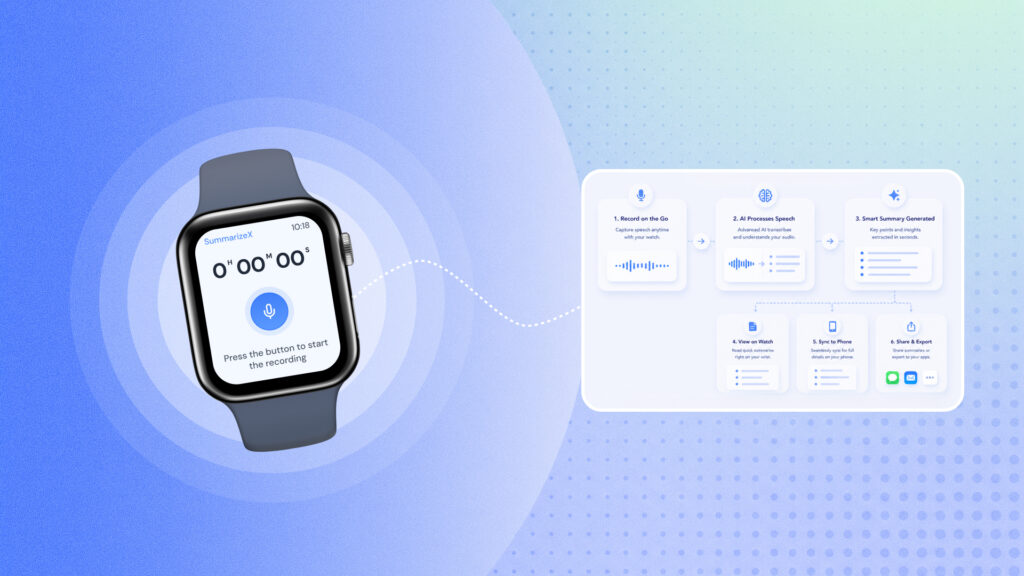
Yes. SummarizeX has a native Apple Watch app that lets you start, pause, and stop recordings directly from your wrist. This is useful for in-person meetings where placing a phone on the table might feel intrusive or overly formal. You tap a record on your Apple Watch and the audio is captured through the watch microphone. The recording is stored locally on your watch and transfers to your iPhone when in range. SummarizeX then processes the audio through AI to generate a full transcript and summary. The Apple Watch app requires watchOS 11.6 or later and works completely offline, so you can record in locations without Wi-Fi or cellular coverage. SummarizeX also supports Wear OS smartwatches for Android users. No other AI note-taking app offers smartwatch recording with AI summarization. Apps like Just Press Record and Whisper Memos can record from Apple Watch but lack the AI summary, multi-language support, and integration with meeting recordings, file uploads, and YouTube summaries that SummarizeX provides.
The Bottom Line
In-person meetings aren’t going away. If anything, the shift back to offices and hybrid work means more face-to-face conversations that need to be captured accurately. The AI tools built for Zoom don’t solve this problem.
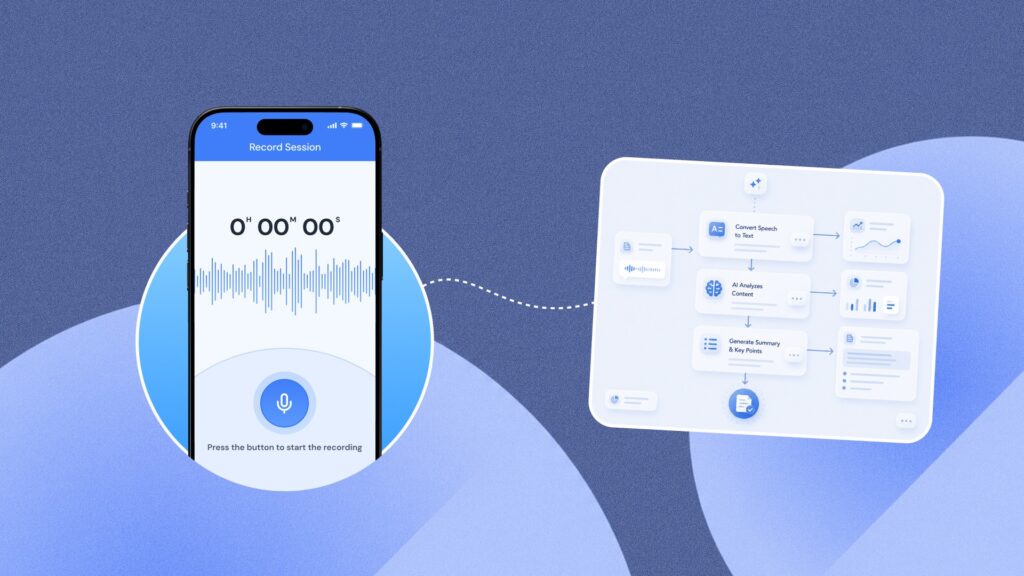
SummarizeX does. It records offline, works from your phone or smartwatch, summarizes in 100+ languages, and costs less than a single month of most competitors’ cheapest plans.
Stop scribbling notes in meetings and hoping you got the important parts right.
Try SummarizeX free – record your next meeting, paste a YouTube link, or upload an audio file and get an AI summary in seconds. No credit card needed.
Download on the App Store | Get it on Google Play | Get Started with Web app